Magic Slate — Color & Draw
Draw app for Android · Free on Google Play
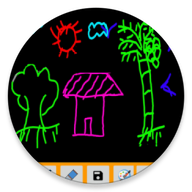
The Magic Slate canvas with a fuller toolbox. Draw on a blank sheet or straight over an existing picture, using several different tools to build the image up.
- Draw over photos
- Multiple tools
- Works offline
About Color & Draw
Magic Slate — Color & Draw takes the Magic Slate canvas and gives it a fuller toolbox. You can open a blank sheet the way you always could, or load one of your own pictures and draw straight onto it.
That second option is what most people install it for. Marking up a photo, adding a caption or a doodle to a picture, or tracing over an image all work here without moving the file into a heavier editing app first.
The app keeps the quick, uncluttered feel of Magic Slate: tools are a tap away, the canvas fills the screen, and there is no account to create. Everything stays on the device.
What Color & Draw does
Start blank or from a picture
Open a clean canvas, or load one of your own pictures and draw straight onto it.
Several tools, not just a pen
Switch between the tools as the image needs them rather than working with a single brush.
The Magic Slate feel
The same quick, uncluttered canvas — with more to reach for when a drawing needs it.
How to use Color & Draw
Three steps from installing it to getting something out of it.
- 1
Install Magic Slate — Color & Draw from Google Play.
- 2
Choose a blank canvas, or pick a picture from your device to draw over.
- 3
Select a tool and a colour, and build the drawing up in layers of strokes.
Version & requirements
- Package name
- com.ng_labs.magic.slate
Permissions & data
Magic Slate — Color & Draw does not collect personal information, and nothing you create in it is uploaded. This app shows no ads at all.
Full privacy policy →Color & Draw questions
Can I draw on my own photos?
Yes. You can start from a blank canvas or load an existing picture and draw on top of it.
How is this different from Magic Slate?
Magic Slate is the plain wipe-clean drawing board. Color & Draw adds more tools and lets you draw over pictures.
Is it free?
Yes, it is free to download from Google Play.