Markers
Draw app for Android · Free on Google Play
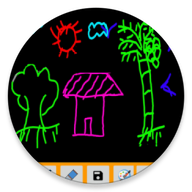
A collection of marker brushes for drawing on a blank canvas or straight onto your own pictures. Simple to pick up, and made for the loose, confident strokes a marker gives you.
- Marker brush set
- Draw over pictures
- Works offline
About Markers
Markers is a focused drawing app built around one idea: the marker pen. Instead of a general brush engine, it gives you a collection of marker styles, each with its own weight and character, and lets you get on with drawing.
Markers suit loose, confident work — sketching a shape, blocking in colour, annotating something quickly. You can work on a blank canvas or open one of your own pictures and draw straight onto it.
There is no setup and no account. The app opens on a canvas and everything stays on your device.
What Markers does
A brush collection, not one pen
Several marker styles to pick from, each with its own weight and feel.
Blank canvas or your own picture
Start from nothing, or open an existing image and mark it up.
Quick to pick up
There is nothing to configure — open the app, choose a marker and start drawing.
How to use Markers
Three steps from installing it to getting something out of it.
- 1
Install Markers from Google Play.
- 2
Start a blank canvas or open one of your pictures.
- 3
Pick a marker and a colour, then draw. Swap markers whenever the stroke needs to change.
Version & requirements
- Package name
- com.ng_labs.markers
Permissions & data
Markers does not collect personal information, and nothing you create in it is uploaded. The free version shows ads, delivered by Google AdMob.
Full privacy policy →Markers questions
Is Markers free?
Yes, it is free to download from Google Play.
Can I draw on an existing picture?
Yes. You can open one of your own pictures and draw over it.